HOW TO ADD A NEW CHILD LOCATION
Learn how to efficiently organize your facility by creating a new sub-location within an existing parent category. This guide walks you through the steps to name and save new locations that should operate under the umbrella of another location (i.e.: storage rooms, closets, surgery rooms).

When creating your location hierarchy, keep in mind that inventory actions, - i.e. (Transfers/Receipts/Takes) can only be performed at the lowest levels of the hierarchy tree locations and require the location to have a physical address.
1. Navigate to https://stockid.wasolutionst.com/locations
Navigate to locations using the left Navigation bar and selecting "Location"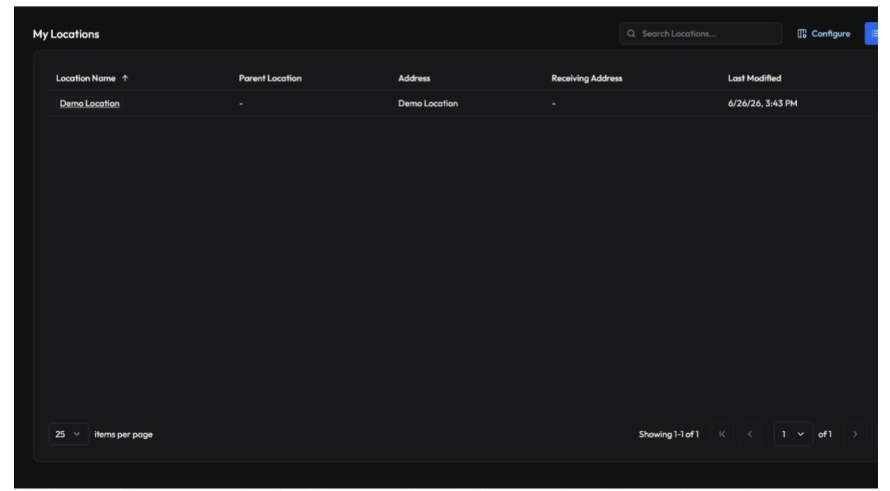
2. Click "+New" to start creating a new location
3. Select "Demo Location" from the Parent Location dropdown
- Parent Locations are where you will be able to set higher level locations in the hierarchy. Parents can have an unlimited number of children; however, a location can only have one parent.
- When you select "inherit a parent location", this will provide the address that the parent has (when provided) to the child.
NOTE: Only a location at the bottom of the hierarchy can hold inventory; parent locations cannot.
4. Type in the Location Name field.
5. Click "Create Location" to save your changes
Location Address might be an optional field; however, a location in the hierarchy must have an address for transactions to occur at a location.
- Ship To Location when enabled allows for a location the ability to have items sent to view orders outside the system as well as transfers from another location in the system.
- Eligible For Replenishment will allow for the location to be chosen for replenishment ranking
Related Articles
HOW TO VIEW LOCATIONS
Learn how to expand your account by adding new locations to your profile. This guide provides a quick walkthrough of the necessary navigation steps to successfully view your location hierarchy, including regions, physical sites, and storage rooms ...HOW TO CONFIGURE A NEW GROUP & CREATE NOTIFICATIONS
Learn how to efficiently create a new group within your platform, assign specific roles, add users, and set up necessary locations. This guide also covers adding automated notifications to ensure your team stays informed and organized. Access ...HOW TO CREATE & CONFIGURE A NEW USER PROFILE
Learn how to efficiently add a new user to your system by setting up their profile, location access, and specific permissions. This guide ensures you can correctly assign roles, groups, and notification settings for seamless account management. User ...HOW TO CREATE A NEW ITEM IN THE SYSTEM
Learn the step-by-step process for adding a new inventory item, including setting up SKU's, units of measure, and hierarchy details. This guide ensures your inventory data is correctly entered for better tracking and management. Initial Setup 1. ...HOW TO CREATE & CONFIGURE A NEW ACCESS ROLE & PERMISSIONS
This guide walks you through the process of setting up a new user role with specific permissions. Learn how to assign necessary resources and save your configurations efficiently. Role Creation 1. Navigate to ...