HOW TO CONFIGURE A NEW GROUP & CREATE NOTIFICATIONS
Learn how to efficiently create a new group within your platform, assign specific roles, add users, and set up necessary locations. This guide also covers adding automated notifications to ensure your team stays informed and organized.
Access Management Navigation
1. Navigate to https://wastockid.wasolutions.com/access/roles
2. Click "Groups" tab
New Group Creation
3. Click "+" icon to create new group.
4. Type "Name" field
5. Click "Create Group"
Group Assignments
6. Click "Add Role"

By adding a role to a group, any user assigned to this group will automatically have this role as well. This can make managing larger organizations and user bases much simpler.
7. Select "Role 1" and click "Add Role"
8. Click "Add User"
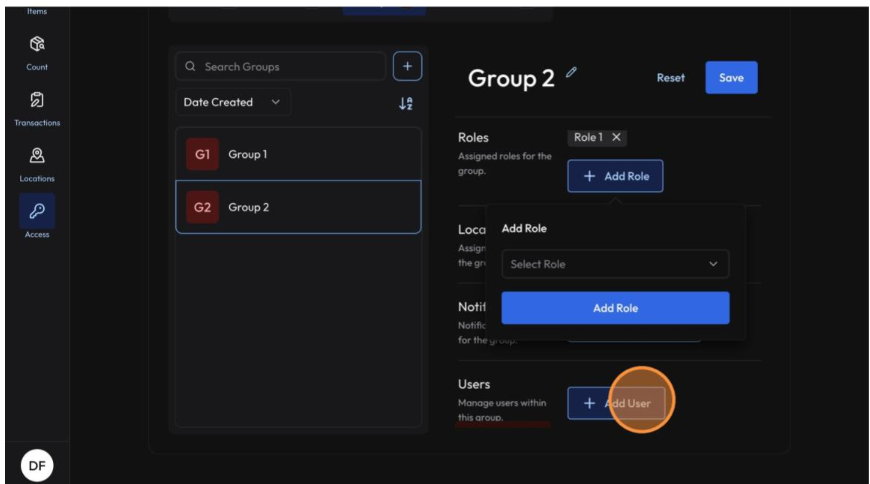
9. Select "Jane Doe" and click "Add User".
10. Click "Add Location"
By adding a location(s) to a group, any user assigned to this group will automatically have access to the location(s) as well. This can make managing larger organizations and user bases much simpler.
11. Select "Storage Closet" and click "Add Location(s)".
Notification Configuration
12. Click "Add Notification"
Group Notifications work in the same manner as they do for Users or External Notifications, they are just applied to all users assigned to the group.
13. Configure "Item approaching expiration" notification and click "Add Notification".
Related Articles
HOW TO CREATE & CONFIGURE A NEW USER PROFILE
Learn how to efficiently add a new user to your system by setting up their profile, location access, and specific permissions. This guide ensures you can correctly assign roles, groups, and notification settings for seamless account management. User ...HOW TO CREATE & CONFIGURE A NEW ACCESS ROLE & PERMISSIONS
This guide walks you through the process of setting up a new user role with specific permissions. Learn how to assign necessary resources and save your configurations efficiently. Role Creation 1. Navigate to ...HOW TO CREATE & CONFIGURE A NEW ROLE USING A TEMPLATE
Learn how to efficiently set up a new user role within the platform by defining names and selecting specific templates. This guide simplifies the role management process to help administrators maintain organized access control. Navigation 1. Navigate ...HOW TO CREATE A NEW ITEM IN THE SYSTEM
Learn the step-by-step process for adding a new inventory item, including setting up SKU's, units of measure, and hierarchy details. This guide ensures your inventory data is correctly entered for better tracking and management. Initial Setup 1. ...HOW TO ADD A NEW CHILD LOCATION
Learn how to efficiently organize your facility by creating a new sub-location within an existing parent category. This guide walks you through the steps to name and save new locations that should operate under the umbrella of another location (i.e.: ...